


Tailoring Addon

Tailoring Addon creates specification variants from a DOORS Next template module. Answers to configured questions are evaluated against artifact formulas, then relevant artifacts are duplicated or reused according to artifact-type selections.
About this offering
Build a specification variant from a controlled templateWorkflow at a glanceInputs and outcomesTechnical prerequisites and limitsA practical questionCommercial scope and next step
Build a specification variant from a controlled template
Tailoring Addon selects DOORS Next template content using questionnaire answers and conditions stored on artifacts. It duplicates or reuses selected content into a target module according to a policy for each artifact type.
It supports common templates across products or variants. Configured rules determine relevance; the extension does not independently decide which requirements a product needs.
Workflow at a glance
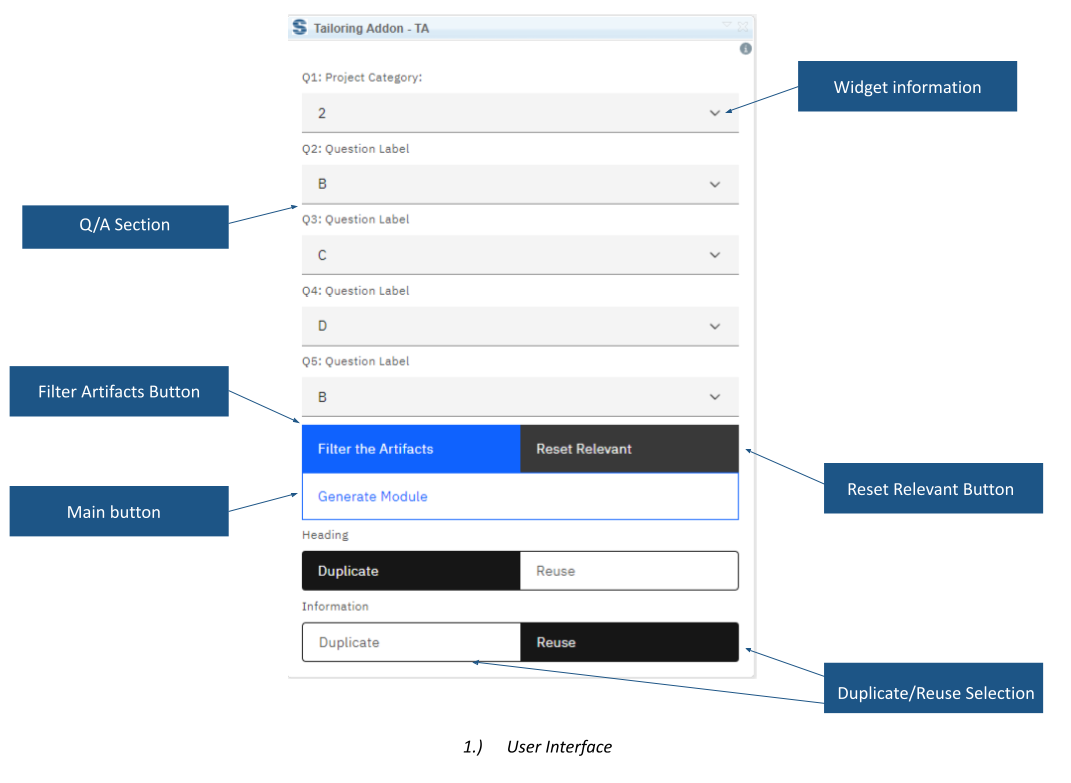
- Prepare rules.Configure questionnaire, artifact formulas and a view filtered to Relevant = True.
- Evaluate the variant.Choose answers and filter to mark non-matching artifacts as not relevant.
- Create target content.Choose duplication or reuse per type and select the prepared target module.
Inputs and outcomes
A Formula string attribute stores conditions using question identifiers. A Relevant boolean, default True, supports the filtered view. The questionnaire is defined in the extension configuration file. Output is duplicated or reused content, including headings considered by the operation.
Technical prerequisites and limits
Module context, named attributes, filtered template view and target module are required. One artifact type cannot be both duplicated and reused in a selection. Reset Relevant sets True across the entire module, not just the current view. Confirm formula coverage, supported releases and installation.
A practical question
Are headings without relevance settings excluded?
No. They are considered for duplication or reuse even without that setting. Validate the resulting document structure.
Commercial scope and next step
Agree eligibility, questionnaire configuration, support and charges. Provide the template, questions, example formulas, target structure and duplication-versus-reuse policy.
Related options to compare
- Artifact Version Number — Reuse and compare requirements. Update artifact version and revision attributes by comparing a DOORS Next module view against a baseline.
- Softacus VCS — Reuse and compare requirements. Compare reused DOORS Next requirements and deliver selected changes between modules, projects and configurations.
These are editorial suggestions for related scenarios; they do not imply a shared licence or a product integration.
Source: Official documentation.
