


Report Generator View

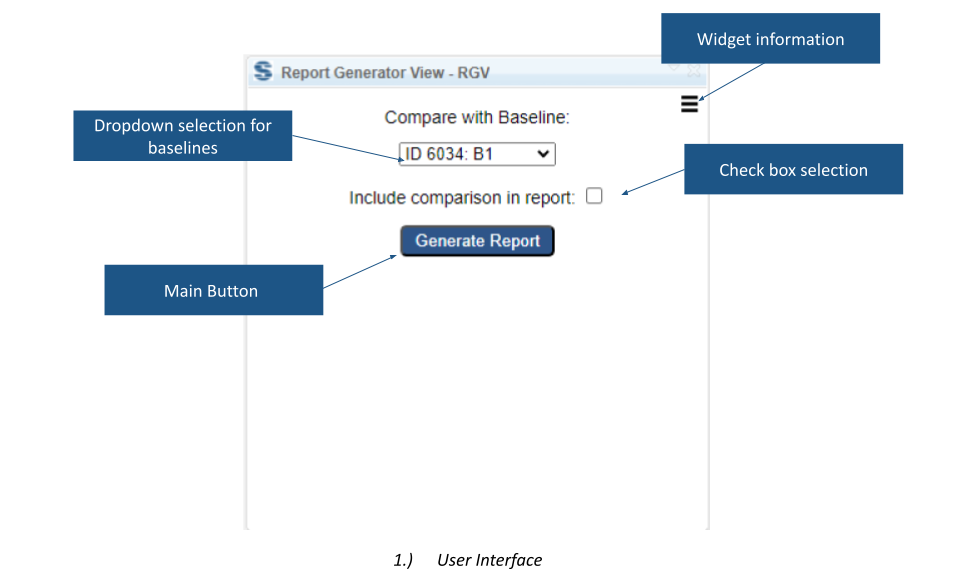
Report Generator View starts document generation from a DOORS Next mini dashboard using Publishing Engine templates. It supports selecting a baseline and including a configuration comparison section in the generated document.
About this offering
Generate a requirements document from the moduleWorkflow at a glanceTemplate-controlled capabilitiesTechnical fit and limitationsA practical questionCommercial scope and next step
Generate a requirements document from the module
Report Generator View provides a DOORS Next mini-dashboard entry point for generation with configured Publishing Engine templates. Authors can start generation in an open module and optionally append a comparison of two configurations.
Document content and presentation depend on the prepared template and configuration. The widget provides an entry point into that workflow.
Workflow at a glance
- Prepare generation.Open the module with the agreed Publishing Engine template and commands.
- Choose the comparison.Select the baseline and whether to include the comparison section.
- Generate and review.Inspect the document and the comparison appended at its end.
Template-controlled capabilities
The documented setup selects attributes, controls inclusion of attribute names, applies formatting and places values in tables with configured columns. These are features of the Publishing Engine Multiple-Purpose Template and its command mechanism, not unconditional controls supplied by the widget alone.
Technical fit and limitations
An open module is required. Comparisons cover stream-to-baseline and baseline-to-baseline scenarios. Confirm output formats, Publishing Engine entitlements, template availability, supported releases and deployment.
A practical question
Can a generated document omit the comparison?
Yes. A checkbox controls inclusion. Its heading can be customised through the configured solution.
Commercial scope and next step
Confirm extension eligibility, template work, installation, support and charges separately. Supply an existing template or example document, required attributes, output format and configurations to compare.
Related options to compare
- Module Hierarchy Generator — Identify and report requirements. Write an artifact's parent hierarchy into a DOORS Next attribute so its module context remains visible.
- DOORS ID Generator — Identify and report requirements. Create custom DOORS Next requirement identifiers using a configured prefix, artifact ID and postfix.
These are editorial suggestions for related scenarios; they do not imply a shared licence or a product integration.
Source: Official documentation.
