


URI Generator

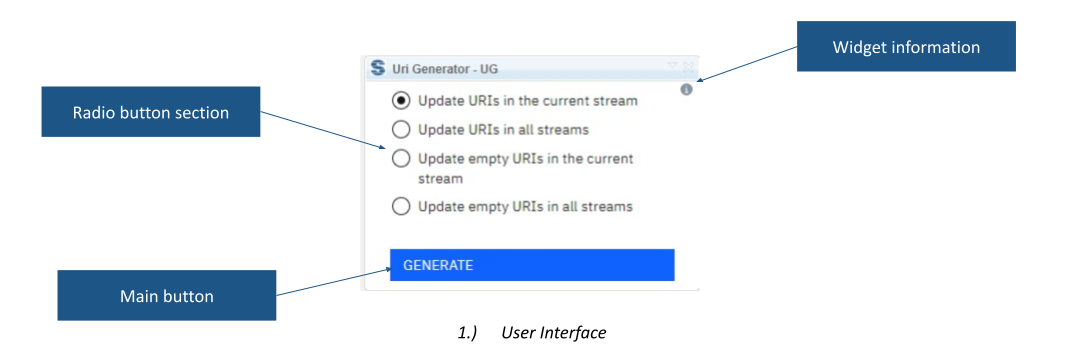
URI Generator creates and updates identifiers for DOORS Next artifact types, data types and attributes. It supports the current stream or all streams in a component, including an option to fill only empty URIs.
About this offering
Apply a consistent URI approach to the type systemWorkflow at a glanceInputs and outputsTechnical fit and boundariesA practical questionCommercial scope and next step
Apply a consistent URI approach to the type system
URI Generator creates or updates identifiers for DOORS Next artifact types, data types and attributes. Administrators can use it when preparing consistent type systems for exchanges between projects, components or environments, including ReqIF scenarios.
It modifies type-system URI values, not requirement IDs, and does not move requirements. URI generation alone does not establish interoperability.
Workflow at a glance
- Review the convention.Identify the component, streams and values to create, update or preserve.
- Select scope.Choose the current stream, all component streams or empty URIs only.
- Generate and inspect.Review resulting values; the documented current-stream operation refreshes the page.
Inputs and outputs
Inputs are type definitions and current URI values. Outputs are generated or updated URIs. The empty-only option addresses missing values without replacing established ones.
Technical fit and boundaries
The source states no additional product-specific prerequisites but does not publish the complete naming algorithm, supported releases, deployment specification or exact permissions. Confirm these and the convention before modifying a shared type system. All-stream processing is scoped to the current component.
A practical question
Can missing URIs be populated while retaining existing values?
Yes. The documented options include empty-only processing across streams in the current component.
Commercial scope and next step
Confirm eligibility, setup, support and charges. Provide type definitions, URI convention, component/stream scope and the receiving system or exchange scenario.
Related options to compare
- Report Generator View — Identify and report requirements. Start document generation from DOORS Next and optionally include a comparison between selected module configurations.
- Module Hierarchy Generator — Identify and report requirements. Write an artifact's parent hierarchy into a DOORS Next attribute so its module context remains visible.
These are editorial suggestions for related scenarios; they do not imply a shared licence or a product integration.
Source: Official documentation.
