


Project Explorer

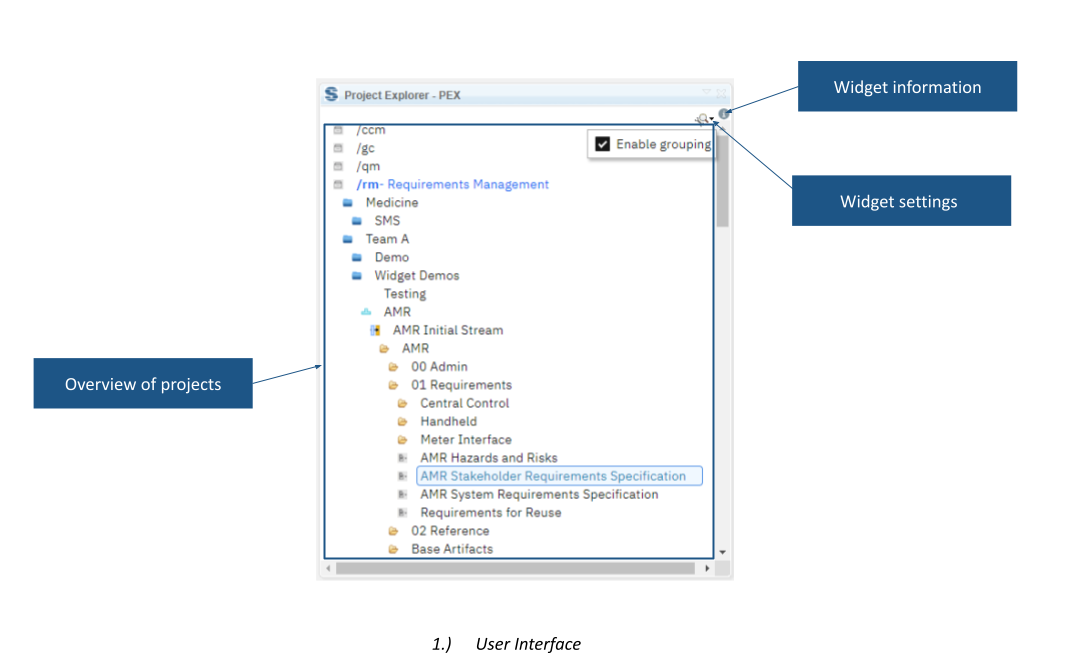
Project Explorer provides a structured navigation view within the DOORS Next mini dashboard. Browse accessible project areas, components, configurations, folders and modules, with search and grouping to organise the overview.
About this offering
Navigate the project landscape from your workspaceWorkflow at a glanceNavigation and organisationTechnical fit and boundariesA practical questionCommercial scope and next step
Navigate the project landscape from your workspace
Project Explorer presents accessible IBM ELM structures in a mini dashboard for DOORS Next users. Engineers can browse from application and project area through components, configurations and folders to modules without repeatedly rebuilding their navigation context.
It is useful across numerous project areas or servers. Its output reflects projects available to the user and does not grant additional access.
Workflow at a glance
- Open the overview.Inspect available applications and project areas.
- Find the context.Expand or search the tree, then navigate components, streams, baselines or change sets.
- Open the module.Select the required module and continue in that context.
Navigation and organisation
The source describes multiple servers and RM, CCM, QM and GC contexts. Open structures are cached. Project areas and components can be grouped with description markers, such as bracketed group names, which appear in the dashboard.
Technical fit and boundaries
The page states no additional product-specific restrictions but does not publish a complete release matrix, installation specification or guarantee identical tree levels in every application. Confirm the actual landscape and access scope. Grouping needs consistent markers; cached navigation does not replace permission management.
A practical question
Does it reveal projects the user cannot access?
The documented overview covers accessible projects. Access requests and role administration are separate workflows.
Commercial scope and next step
Confirm eligibility, setup, support and charges. Provide application servers, project/component structure, configuration setup, grouping convention and the navigation journeys that take most effort.
Related options to compare
- Delete Duplicated Views — Administer DOORS Next projects. Find duplicate views in a DOORS Next module and remove them through a dedicated widget.
- Collection Creation — Administer DOORS Next projects. Create a named collection from selected DOORS Next module artifacts without leaving the module.
These are editorial suggestions for related scenarios; they do not imply a shared licence or a product integration.
Source: Official documentation.
