


User Project Access

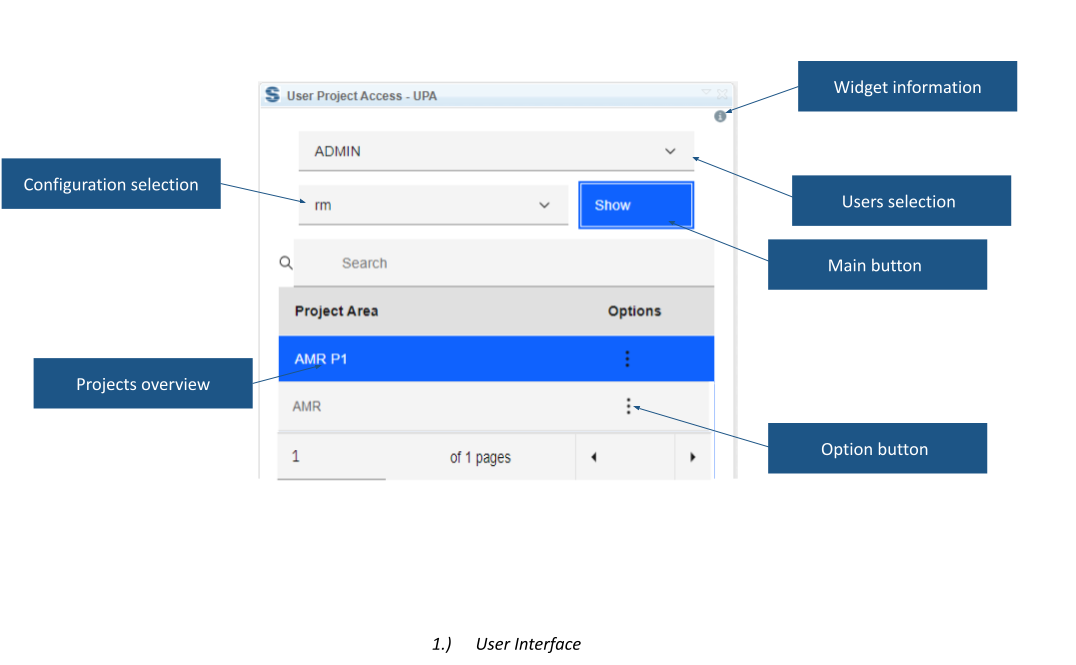
User Project Access provides a user-centred view of project membership and roles. Administrators can select a user, inspect project access and add or remove roles where their permissions allow changes.
About this offering
Review project membership from the user's perspectiveWorkflow at a glanceInputs and outcomesTechnical prerequisites and limitsA practical questionCommercial scope and next step
Review project membership from the user's perspective
User Project Access gives administrators a consolidated view of a person's IBM ELM project-area access. Select a user and application, review projects and manage available roles where authorised.
It suits role changes and cross-project access reviews. The documented workflow supports adding or removing roles, including multiple changes, and adding a user to a project area.
Workflow at a glance
- Select user and application.Choose the person and context to inspect.
- Review membership.Load the overview; accessible project areas are visually distinguished.
- Manage permitted roles.Open project controls and add or remove available roles.
Inputs and outcomes
Inputs are user, application and project-area role definitions. Output is an overview and, after authorised changes, updated assignments. The source lists RM, GC, QM and CCM contexts. Choices come from project-area properties rather than a universal role list.
Technical prerequisites and limits
The operator must already have permission to edit or remove roles. The widget does not bypass permissions or establish an approval policy. Confirm supported releases, installation and application coverage for the supplied version.
A practical question
Can an ordinary user grant themselves administrator rights?
The prerequisite requires role-editing permissions. This is an administration interface, not a permission bypass.
Commercial scope and next step
Confirm eligibility, deployment, support and charges. Supply application landscape, roles, administrator responsibilities and the joiner/mover/leaver or review scenario. Agree how changes will be approved and checked.
Related options to compare
- Request Project Access — Administer DOORS Next projects. Let non-administrator users request access to project areas and notify the configured administrators for review.
- Project Explorer — Administer DOORS Next projects. Browse accessible projects, components, configurations and modules from a structured overview in the DOORS Next mini dashboard.
These are editorial suggestions for related scenarios; they do not imply a shared licence or a product integration.
Source: Official documentation.
