


Artifact Version Number

Artifact Version Number calculates version and revision attributes from changes to DOORS Next artifacts. It compares the selected module view with a chosen baseline to support a focused review.
About this offering
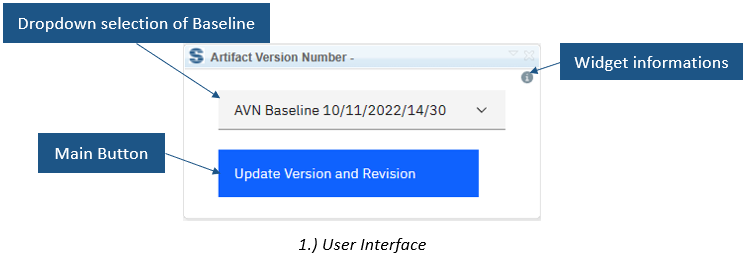
Expose baseline-relative revisions to reviewersWorkflow at a glanceInputs and resultsTechnical fit and boundariesEvaluation questionsPlan your evaluation
Expose baseline-relative revisions to reviewers
Artifact Version Number calculates version and revision attribute values for IBM DOORS Next artifacts by comparing the current configuration with a selected baseline. Reviewers see change indicators alongside requirements. A selected module view limits processing. The vendor describes use alongside formal review and Publishing Engine export; the widget itself does not perform that export or approve requirements.
Workflow at a glance
Editorial overview based on vendor documentation.
- Select the scopeOpen the module and choose the view containing relevant artifacts.
- Choose the baselineSelect the reference defining this review cycle.
- Calculate and verifyWrite values and inspect representative changed and unchanged artifacts.
Inputs and results
Inputs are current artifacts, a baseline and version/revision fields. Outputs are calculated attribute values. The source describes common data types including enumerations, strings, numbers, dates, booleans and users.
Technical fit and boundaries
A module, selected view and configured attributes are required. Repeated execution against the same baseline overwrites current values. Agree numbering conventions and confirm calculation rules, release compatibility, installation and permissions.
Evaluation questions
Does every run add a revision? The documented operation recalculates against the baseline; it is not an independent edit counter. Does it create baselines? No baseline-creation function is documented.
Plan your evaluation
Supply the baseline strategy, attribute definitions, sample view and expected changed/unchanged results. Confirm extension eligibility, implementation and support in the offer.
Related options to compare
- Compare Module Across Configurations — Its Version/Revision mode compares these attributes when the appropriate fields and variant are configured.
- Module Baselines — Baseline selection supports a repeatable review process.
These are editorial suggestions for related scenarios; they do not imply a shared licence or a product integration.
Source: Official documentation.
