


Tables To Artifacts Converter

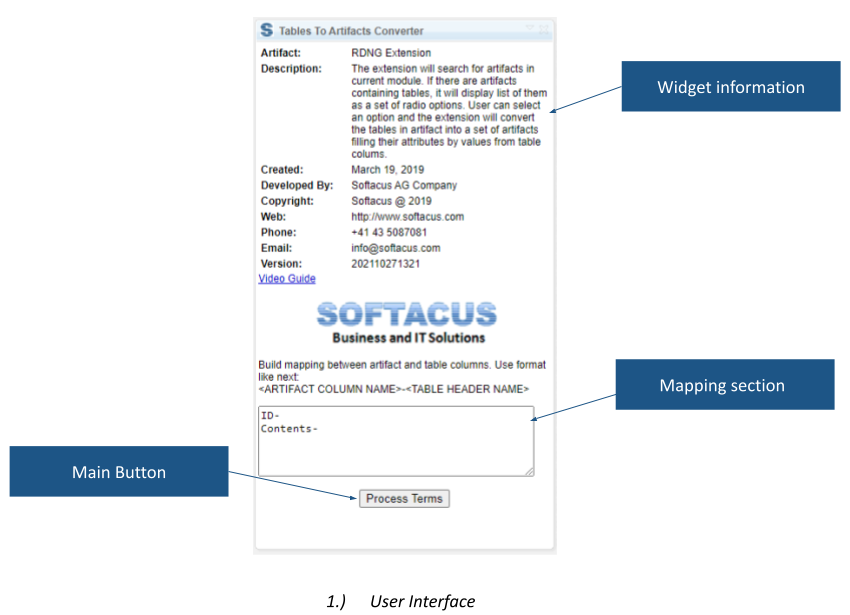
Tables To Artifacts Converter creates DOORS Next artifacts from tables already present in a module. Map table columns to artifact attributes, then generate requirements populated with the mapped table data.
About this offering
Turn table-based specifications into requirement recordsWorkflow at a glanceInputs and resulting artifactsTechnical fit and boundariesA practical questionCommercial scope and next step
Turn table-based specifications into requirement records
Tables To Artifacts Converter generates DOORS Next artifacts from tables inside a module. Engineers map columns to artifact attributes instead of manually transcribing each requirement.
It suits imported specifications that leave requirements inside a table when the project needs individually managed records. The table must already be created or imported into the module.
Workflow at a glance
- Prepare the table.Select the module artifact containing it.
- Define the mapping.Match columns to the intended artifact structure and attributes.
- Generate and inspect.Verify new artifacts against representative entries.
Inputs and resulting artifacts
Inputs are the module table, available artifact definitions and column mapping. Output is a set of artifacts populated with mapped information. Labels and values must correspond to intended attributes and data types.
Technical fit and boundaries
The extension is module-only. Exhaustive rules for merged cells, nested tables, unusual formatting and incompatible attribute values are not published. Source-table retention is also not established for every implementation. Check these behaviours with a sample and confirm release support, installation and creation permissions.
A practical question
Does it decide the mapping automatically?
The documented workflow requires the user to establish mapping before generation.
Commercial scope and next step
Confirm eligibility, setup, support and charges. Supply an anonymised table, artifact types, attribute definitions and expected results for sample rows, including exceptional cells or values.
Related options to compare
- HTML To Formatted Text — Transform and structure requirements. Convert HTML content into rich text for selected artifacts or a whole DOORS Next module.
- Split and Join — Transform and structure requirements. Split requirement content into separate artifacts or combine selected artifacts within a DOORS Next module.
These are editorial suggestions for related scenarios; they do not imply a shared licence or a product integration.
Source: Official documentation.
