


Split and Join

Split and Join restructures content within DOORS Next modules. Divide an artifact by paragraphs or list items, or combine selected artifacts when imported content needs a different level of requirement granularity.
About this offering
Give imported requirements the right granularityWorkflow at a glanceInputs and outputsTechnical fit and limitationsA practical questionCommercial scope and next step
Give imported requirements the right granularity
Split and Join changes how content is distributed across DOORS Next artifacts. Engineers can divide a large artifact into smaller requirements or combine related records after import from Word, Excel or another source.
The extension helps decide which content should be managed, attributed and linked together. A preview allows inspection before processing.
Workflow at a glance
- Select content.Open the module and choose one artifact to split or an ordered set to join.
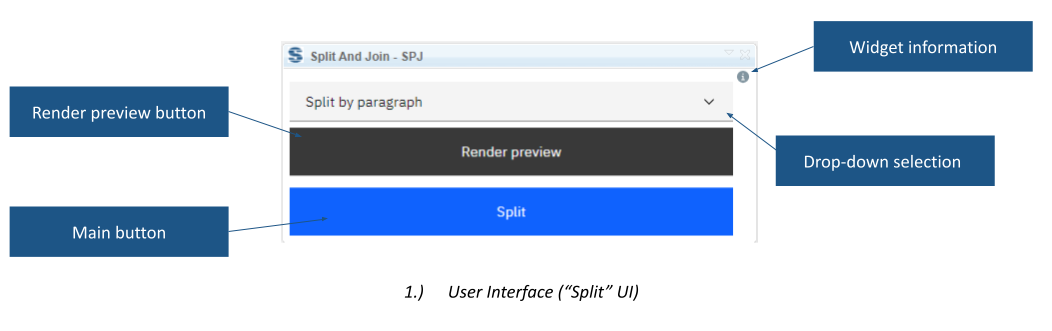
- Choose and preview.Select paragraph, bullet-list or numbered-list boundaries and render the preview.
- Apply the structure.Run the operation and inspect the resulting granularity.
Inputs and outputs
Splitting turns structured content from one artifact into smaller artifacts. Joining combines selected artifacts into one. The source describes at least two paragraphs for splitting and separately lists paragraph, bulleted-list and numbered-list modes.
Technical fit and limitations
The widget is module-only. Joining depends on selection and order. The public page does not fully define preservation of every attribute, link or other metadata during restructuring. Include these expectations in evaluation. Confirm supported releases and installation.
A practical question
Can the result be inspected before processing?
Yes. Render Preview shows the proposed content structure.
Commercial scope and next step
Confirm eligibility, deployment, support and charges. Provide representative content, required boundaries or joining order, and attributes and links to check afterwards.
Related options to compare
- Artifact Generator — Transform and structure requirements. Compose requirement text from predefined sentence elements and create or update artifacts in DOORS Next.
- Attribute Processor — Transform and structure requirements. Combine multiple DOORS Next attribute values and fixed text into a chosen output attribute.
These are editorial suggestions for related scenarios; they do not imply a shared licence or a product integration.
Source: Official documentation.
