


Attribute Processor

Attribute Processor concatenates values from selected DOORS Next attributes into a single text result. It converts supported inputs to strings and lets users save reusable personal or shared operation profiles.
About this offering
Combine attributes into a consistent text resultWorkflow at a glanceInputs and resultsTechnical fit and boundariesEvaluation questionsPlan your evaluation
Combine attributes into a consistent text result
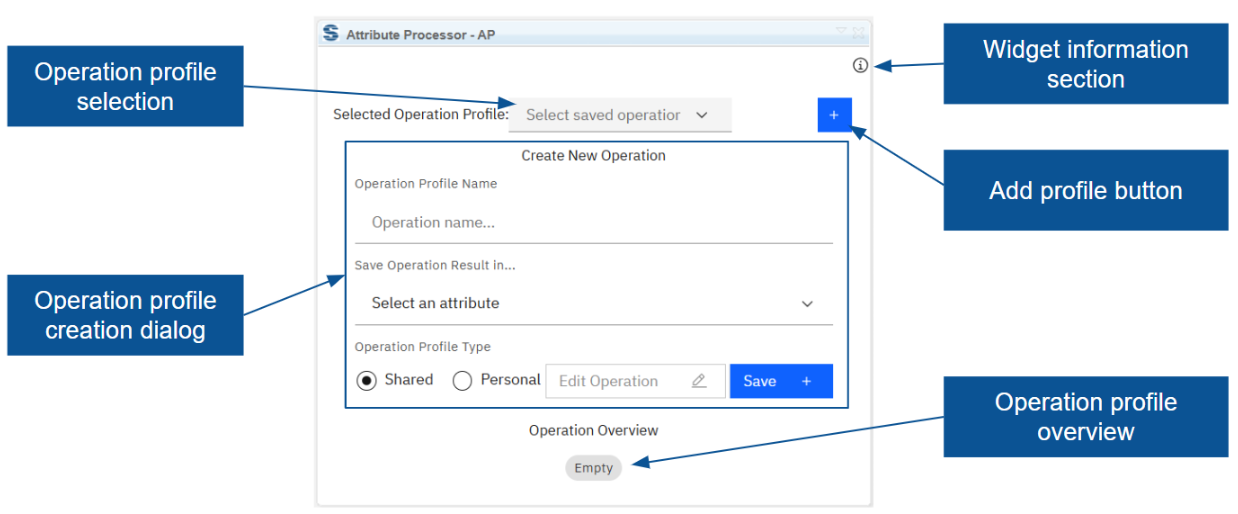
Attribute Processor joins values from several IBM DOORS Next attributes and writes the result into a chosen field. Its documented operation is CONCAT: inputs become strings and combine with optional fixed text, separators or labels. Administrators can assemble a display value from priority, date and status. Personal or shared profiles preserve input order, constants and destination field.
Workflow at a glance
Editorial overview based on vendor documentation.
- Define the operationSelect CONCAT, input attributes, constants and the result field.
- Check a sampleInspect the preview and verify formatting on representative records.
- Apply the scopeProcess selected artifacts, a view, or the relevant module or folder, then inspect stored results.
Inputs and results
Inputs include numbers, dates, booleans, enumerations, users and text. Output is a combined string. A saved profile stores configuration separately from processed values.
Technical fit and boundaries
Selected artifacts or a view constrain execution. Without that selection, the documented module/folder operation processes all artifacts in its context. Confirm field suitability, value formatting, edit rights, installation and release before broad changes.
Evaluation questions
Is this an arithmetic engine? Only CONCAT is documented. Do input changes continuously recalculate the result? Continuous operation is not established; the source describes running a stored operation.
Plan your evaluation
Provide input types, exact output examples, destination field, profile visibility and missing/multiple-value cases. Confirm eligibility, configuration and support in the offer.
Related options to compare
- Artifact Generator — Use structured sentence composition when the goal is authoring requirement content rather than combining attribute values.
- DOORS ID Generator — Consider the dedicated identifier workflow for PREFIX-ID-POSTFIX formatting.
These are editorial suggestions for related scenarios; they do not imply a shared licence or a product integration.
Source: Official documentation.
