


Artifact Generator

Artifact Generator helps authors construct requirement text using configured sentence elements and optional custom input. It creates new artifacts or updates existing ones within a DOORS Next module.
About this offering
Compose requirements from an agreed sentence structureWorkflow at a glanceInputs and resultsTechnical fit and boundariesEvaluation questionsPlan your evaluation
Compose requirements from an agreed sentence structure
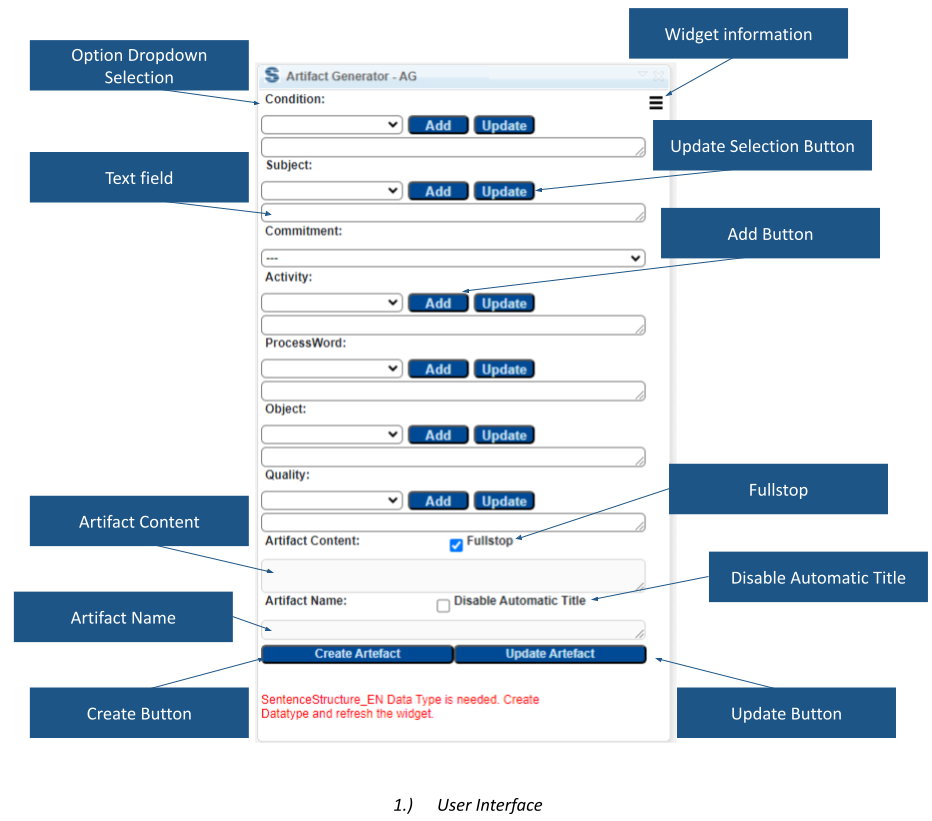
Artifact Generator helps IBM DOORS Next authors assemble primary text from predefined sentence components and custom text. It can create a new artifact or update a selected artifact inside the module. Teams use an approved requirement pattern and vocabulary, previewing content and name before applying the change. Structured authoring does not replace review of requirement meaning.
Workflow at a glance
Editorial overview based on vendor documentation.
- Prepare the vocabularyConfigure sentence-structure attributes and choose the module and artifact context.
- Compose and inspectSelect components, add custom text, and review generated content and title.
- Create or updateUpdate the selection or create an artifact before, after, or as a child of it.
Inputs and results
Inputs are configured values, author text and module position. Outputs are the artifact’s Name and Primary Text. The interface includes title-editing and punctuation options.
Technical fit and boundaries
The extension is module-only and requires SentenceStructure_EN attributes in the project or component. Agree artifact types and allowed values. Confirm release, installation and editing permissions; arbitrary sentence grammars are not established as working without configuration.
Evaluation questions
Can the title differ from the text? Yes, the generated name can become editable. Can it change an existing requirement? Yes; verify the selected artifact before updating it.
Plan your evaluation
Bring an approved sentence pattern, sample requirements, attribute definitions, placement rules and release. Confirm vendor eligibility, configuration work and support in the offer.
Related options to compare
- Glossary Terms Creation — Connect authored requirement wording to predefined terminology.
- DOORS ID Generator — Apply a configured identifier convention to authored requirements.
These are editorial suggestions for related scenarios; they do not imply a shared licence or a product integration.
Source: Official documentation.
