


Module Hierarchy Generator

Module Hierarchy Generator records a textual representation of parent structure in a DOORS Next attribute. This makes hierarchy information available alongside artifacts in filtered views and supports updating it after module structure changes.
About this offering
Keep a requirement's structural context visibleWorkflow at a glanceInputs and outcomesTechnical limitsA practical questionCommercial scope and next step
Keep a requirement's structural context visible
Module Hierarchy Generator writes a textual representation of an artifact's parent hierarchy into a Hierarchy attribute in IBM DOORS Next. It helps reviewers understand where an artifact belongs when a filtered view hides surrounding headings.
The generated attribute makes context available during linking, review and reporting. It does not create a new hierarchy or automatically resolve different positions of an artifact reused across modules.
Workflow at a glance
- Prepare the attribute and view.Create the corresponding attribute, then open the module and selected view.
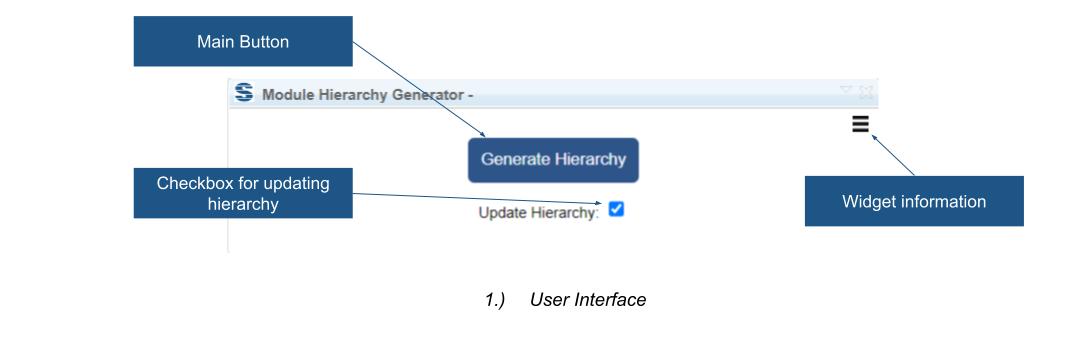
- Generate values.Run the extension to record parent structure for the artifacts.
- Refresh after changes.Use the update option after restructuring and inspect warnings about reuse.
Inputs and outcomes
Input is the artifact's position in a module hierarchy; output is stored attribute text. For example, a status-filtered review can show relevant requirements while the generated value retains an indication of omitted parent headings.
Technical limits
A module, selected view and corresponding attribute are required. Softacus cautions against reusing the same artifacts across modules for this workflow: a shared artifact can occupy different hierarchies. The extension warns about reuse, but separate values for every reuse context are not established. Confirm releases, installation and attribute configuration.
A practical question
Is the generated hierarchy always current?
An explicit update option is provided. Include it after structural changes rather than assuming continuous synchronisation.
Commercial scope and next step
Agree eligibility, configuration assistance, support and charges. Provide a module, target attribute, filtered views and details of reuse across modules.
Related options to compare
- Tables To Artifacts Converter — Transform and structure requirements. Convert table content in a DOORS Next module into artifacts using mappings from columns to attributes.
- HTML To Formatted Text — Transform and structure requirements. Convert HTML content into rich text for selected artifacts or a whole DOORS Next module.
These are editorial suggestions for related scenarios; they do not imply a shared licence or a product integration.
Source: Official documentation.
