


Math Function Generator

Math Function Generator creates and edits mathematical expressions in DOORS Next modules. Enter a LaTeX formula, preview its appearance and insert it as an image associated with the selected artifact.
About this offering
Present equations within requirements modulesWorkflow at a glanceInputs, outputs and editor optionsTechnical prerequisitesA practical questionCommercial scope and next step
Present equations within requirements modules
Math Function Generator creates and updates mathematical expressions in IBM DOORS Next modules. Authors enter LaTeX notation, preview its rendering and insert the result as an image, with a documented route for later edits.
It suits specifications needing clearer presentation of mathematical relationships. It renders notation; symbolic calculation, simulation and mathematical validation are not described capabilities.
Workflow at a glance
- Prepare the module.Create the Formula string attribute and select the artifact after which the expression should appear.
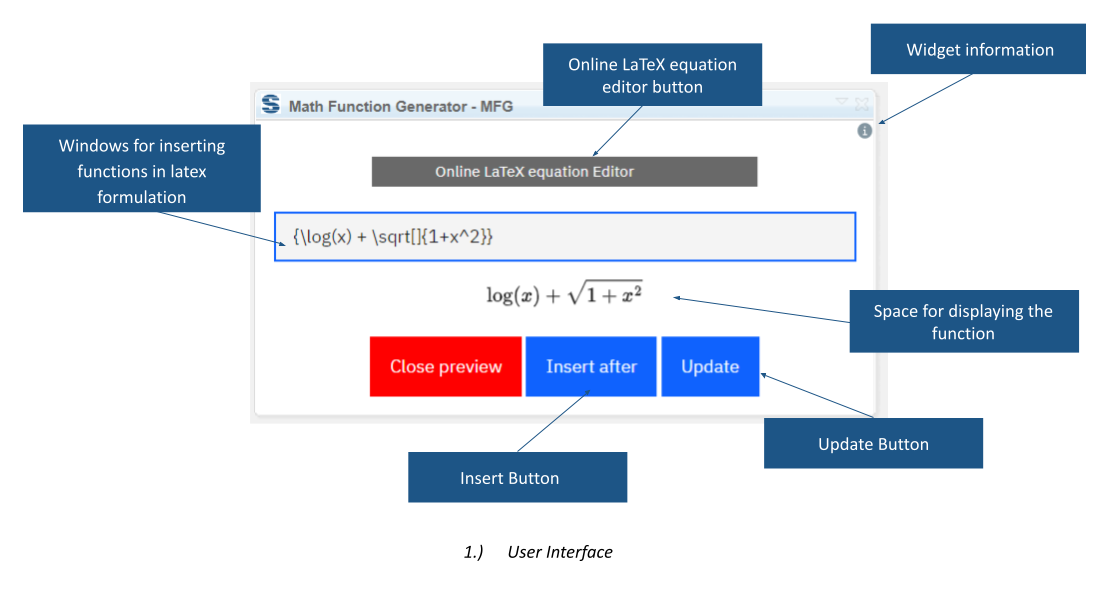
- Enter and preview.Provide LaTeX notation and horizontal/vertical image dimensions.
- Insert or update.Create the formula image or select an existing function artifact to update it.
Inputs, outputs and editor options
Inputs are the expression, dimensions and module context. The output is a formula represented as an image file in the module. The interface links to an online LaTeX editor; Softacus also describes a version without that editor.
Technical prerequisites
A string attribute named Formula must exist in project or component properties. Module context and an appropriate selection are required; otherwise the widget displays an informational message instead of running. Confirm supported releases, installation and rendering coverage.
A practical question
Must users use an external equation editor?
An online editor is offered, and a version without it is mentioned. Confirm the supplied variant and data-handling requirements rather than assuming an offline-processing guarantee.
Commercial scope and next step
Agree eligibility, variant, implementation assistance, support and charges. Provide representative equations, image sizing, release and restrictions on external services.
Related options to compare
- Set and Remove Formatting — Manage supporting content. Reset or apply text formatting across selected DOORS Next artifacts, including content imported from external documents.
- Image Gallery — Manage supporting content. Preview images from selected DOORS Next folders in the mini dashboard and identify their artifacts.
These are editorial suggestions for related scenarios; they do not imply a shared licence or a product integration.
Source: Official documentation.
