


Links Builder

Links Builder applies configured rules to traceability links in DOORS Next. Rules consider artifact types, relationship types and artifact placement, helping users create links that follow the linking structure defined for their project.
About this offering
Guide link creation with project rulesWorkflow at a glanceInputs and outcomesTechnical fit and boundariesA practical questionCommercial scope and next step
Guide link creation with project rules
Links Builder helps IBM DOORS Next users create traceability links according to configured rules considering artifact types, relationship type and placement. It suits projects with a defined traceability policy whose authors need guidance applying it.
The extension also checks artifacts and existing links against those rules. This is a focused policy check, not proof that an entire specification or regulatory traceability model is correct.
Workflow at a glance
- Configure the rules.An authorised administrator prepares the linking rules.
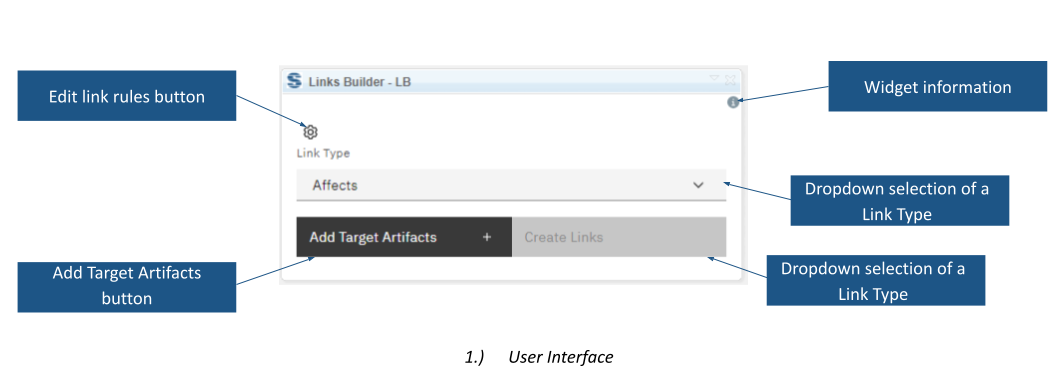
- Select the relationship.Choose the link type and target through DOORS Next or the widget's dialog.
- Check and create.Review guidance, create the permitted link and inspect existing relationships with Check Artifacts.
Inputs and outcomes
Inputs are the rule set, selected artifacts, types and locations. Outputs are requirements-management links and feedback about rule conformity. Available relationship types come from the project or component. Checks run when an artifact is selected or the action is requested.
Technical fit and boundaries
Creation is documented for one pair of artifacts at a time. Rule editing requires the Administrator role. The source mentions rules stored in SJA and in a configured artifact; confirm exact storage and deployment for the supplied implementation. Supported releases and installation prerequisites are not fully specified.
A practical question
Is this a bulk link generator?
The linking operation supports a pair at a time. Attribute-driven bulk reconstruction is a different workflow.
Commercial scope and next step
Confirm eligibility, installation, rule configuration, support and charges. Supply artifact types, the allowed relationship matrix, placement restrictions and administrator model for a representative evaluation.
Related options to compare
- Link by Foreign Attribute — Build and maintain traceability. Create DOORS Next links between module artifacts using identifiers and mapping rules held in custom attributes.
- Link Switcher — Build and maintain traceability. Convert existing DOORS Next links between base artifact context and module context for selected link types.
These are editorial suggestions for related scenarios; they do not imply a shared licence or a product integration.
Source: Official documentation.
