


Link by Foreign Attribute

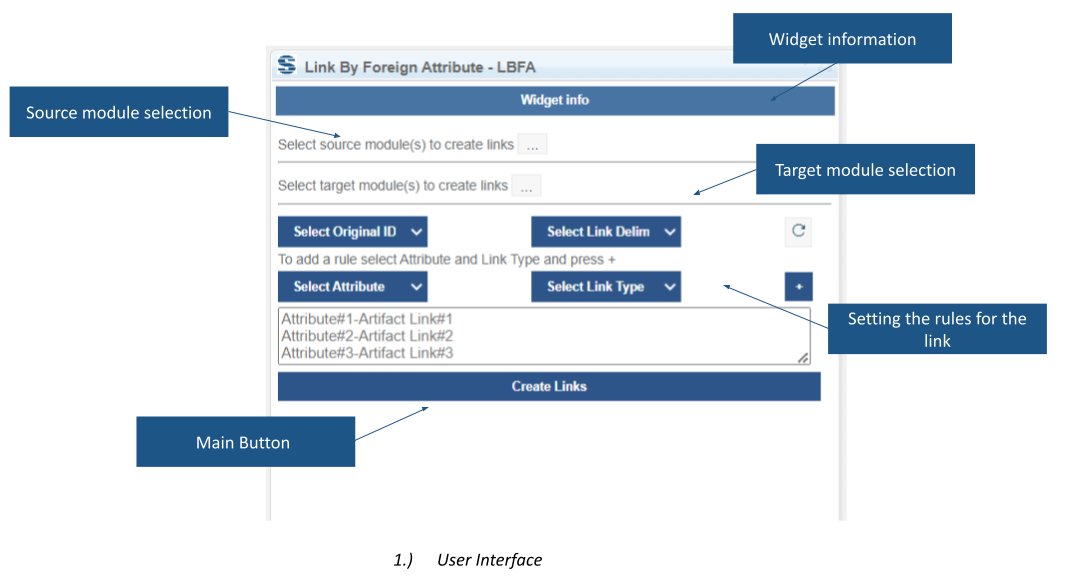
Link by Foreign Attribute creates links between artifacts in selected DOORS Next modules using custom attributes. Define source and target modules, then map attribute information to link types for requirements imported or maintained across modules.
About this offering
Reconstruct relationships from imported identifiersWorkflow at a glanceInputs, outputs and configuration contextTechnical limitsA practical questionCommercial scope and next step
Reconstruct relationships from imported identifiers
Link by Foreign Attribute creates links between IBM DOORS Next module artifacts using relationship information stored in custom attributes. It is useful when requirements arrive from another tool, for example through an Excel-based transfer, and external identifiers must become navigable requirements links.
The extension combines source and target module selections with rules describing attribute names and link types. Multiple relationship types can be created in one operation. Correct imported identifiers remain essential inputs.
Workflow at a glance
- Prepare modules and a saved view.Open the module context, save the view and select source and target modules.
- Define the rules.Map custom attributes to the required relationships and link types.
- Create and review links.Run the operation and inspect representative relationships against the traceability model.
Inputs, outputs and configuration context
Inputs are module artifacts, custom attribute values and linking rules. Outputs are module-artifact links. The documentation describes operation across project areas, components, change sets and global configurations. The intended server, version and configuration combination still needs evaluation.
Technical limits
A module and saved view are required. Softacus advises against processing more than 2,000 artifacts at a time; practical capacity depends on client and server hardware. Loading module information can take time. Installation requirements and exact supported releases need confirmation.
A practical question
Can one run create different relationship types?
Yes, provided the source data and rules describe the required relationships correctly.
Commercial scope and next step
Confirm eligibility, support, configuration work and charges. Supply anonymised identifier samples, source and target modules, expected link directions, configuration context and artifact counts.
Related options to compare
- Link Switcher — Build and maintain traceability. Convert existing DOORS Next links between base artifact context and module context for selected link types.
- Link Type Change — Build and maintain traceability. Change link direction or relationship type for selected artifacts or a complete DOORS Next module.
These are editorial suggestions for related scenarios; they do not imply a shared licence or a product integration.
Source: Official documentation.
