


Link Switcher

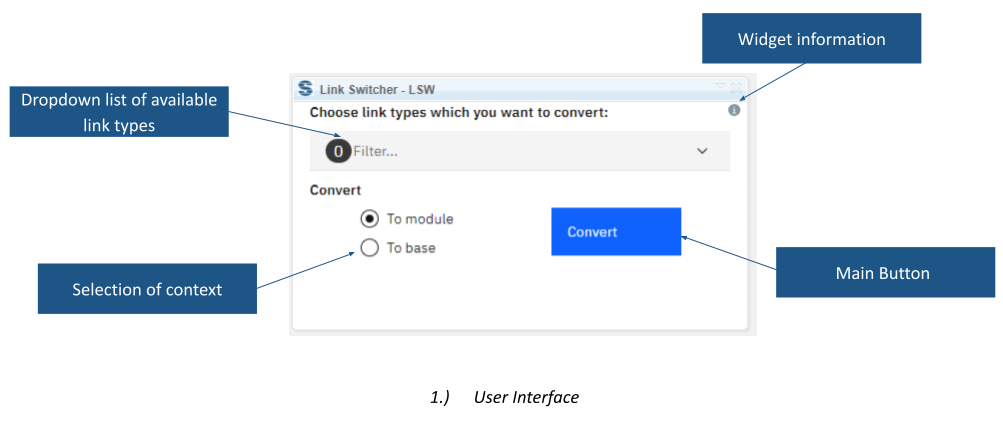
Link Switcher changes whether existing DOORS Next links use base artifact or module context. Select the link types and target context, then process a module, a view or selected artifacts.
About this offering
Move existing links to the required contextWorkflow at a glanceWhat changesTechnical limits that matterA practical questionCommercial scope and next step
Move existing links to the required context
Link Switcher changes existing IBM DOORS Next links between base-artifact and module-artifact context. It addresses links created at the wrong level or a change in requirements-linking policy after relationships already exist.
Requirements administrators can select relationship types and target a complete module, current view or selected artifacts. The extension changes context; choosing a different relationship type is a separate task.
Workflow at a glance
- Define the affected scope.Open the module, review the view or selection and choose the link types.
- Select the target context.Choose base or module context.
- Process and verify.Run conversion and inspect the resulting endpoints and incomplete operations.
What changes
Inputs are existing links of the selected types and their endpoints. The output is those relationships expressed in the chosen context. The documented behaviour transfers both source and destination endpoints, making the state and accessibility of both sides relevant.
Technical limits that matter
The widget runs only in a module. Access restrictions or an endpoint already in a baseline can prevent completion. When converting to module context, an opposite-side artifact reused in several modules is transferred to the first module returned to the widget. Review that behaviour carefully where reuse is common.
A practical question
Can it choose the intended module for every reused artifact?
The documentation describes a first-returned-module rule, not general disambiguation. Check these cases before broad conversion.
Commercial scope and next step
Confirm supported releases, installation, eligibility, support and charges. Provide link types, intended context, source and target configurations, permissions and examples of reused artifacts. Agree a representative evaluation before changing the wider link set.
Related options to compare
- Link Type Change — Build and maintain traceability. Change link direction or relationship type for selected artifacts or a complete DOORS Next module.
- Module Link Statistics — Build and maintain traceability. Inspect linked and unlinked requirements and link validity through charts inside a DOORS Next module.
These are editorial suggestions for related scenarios; they do not imply a shared licence or a product integration.
Source: Official documentation.
