


Link Type Change

Link Type Change modifies existing DOORS Next relationships by changing their type or direction. Use it to correct link conventions or consolidate relationship types across selected artifacts or an entire module.
About this offering
Correct relationship types and directionsWorkflow at a glanceConfiguration prerequisitesDocumented boundariesA practical questionCommercial scope and next step
Correct relationship types and directions
Link Type Change modifies the type or direction of existing IBM DOORS Next relationships. Requirements engineers can use it after a traceability convention changes, when types need consolidation or a review finds links in the wrong direction.
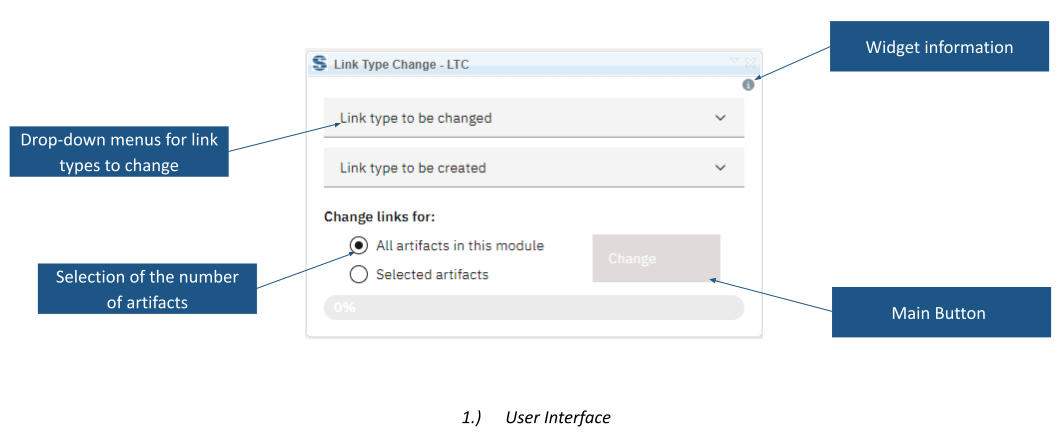
Inputs are an existing link-type selection, a replacement type and an artifact scope. Selected-artifact and module-wide operations are documented. An optional setting retains link-validity status, excluding validity comments.
Workflow at a glance
- Check the target relationship.Ensure required types exist and project restrictions permit creation.
- Select the change.Choose original and replacement types, scope and validity-status handling.
- Run and inspect.Verify representative relationships, directions and validity states.
Configuration prerequisites
Softacus describes cross-component linking in local non-GC, local GC-enabled and global-configuration environments. Custom links across components require RDF URIs configured in both configurations. With a baseline, creation or deletion is limited to an outgoing link on the stream side, following DOORS Next restrictions.
Documented boundaries
Links to or from other applications, including CCM, QM, AM and RM2, are not detected. Base artifacts can be processed only through Selected Artifacts, with a maximum of 200 at a time. Exact supported releases and deployment need confirmation.
A practical question
Does retaining validity retain its comments?
No. The option preserves validity status without the associated comments.
Commercial scope and next step
Confirm eligibility, installation, support and charges. Provide configurations, current and desired directions, link restrictions, RDF URI definitions and artifact scope. Identify baseline and cross-application cases for separate handling.
Related options to compare
- Module Link Statistics — Build and maintain traceability. Inspect linked and unlinked requirements and link validity through charts inside a DOORS Next module.
- Show Linked Attributes — Build and maintain traceability. Display selected requirement attributes alongside attributes from linked artifacts while working in a DOORS Next module.
These are editorial suggestions for related scenarios; they do not imply a shared licence or a product integration.
Source: Official documentation.
