


Glossary Terms Creation

Glossary Terms Creation finds text matching predefined terms in DOORS Next modules and creates glossary references. It can search selected configurations and update existing reference text after a term is renamed.
About this offering
Connect requirement wording to shared terminologyWorkflow at a glanceInputs and resultsTechnical fit and boundariesEvaluation questionsPlan your evaluation
Connect requirement wording to shared terminology
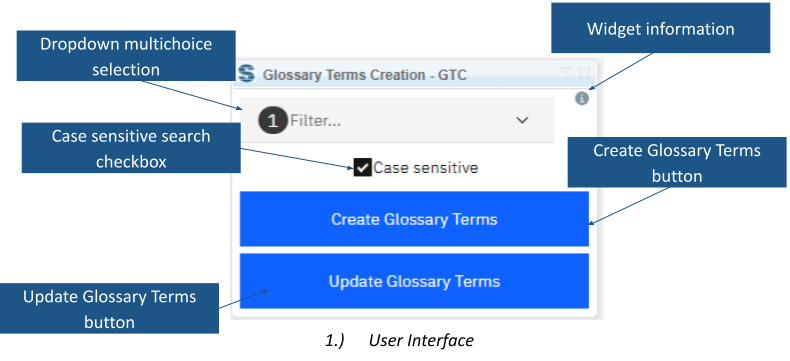
Glossary Terms Creation matches IBM DOORS Next module text to predefined glossary terms. It creates hyperlinks and OSLC Reference term base links, helping readers navigate to intended definitions. Authors search selected configurations, including libraries in other projects or components. Selected artifacts or a view narrow processing for terminology review after import or ongoing vocabulary maintenance.
Workflow at a glance
Editorial overview based on vendor documentation.
- Choose the librarySelect configurations and decide whether matching is case-sensitive.
- Process the scopeUse selected artifacts, a view or the module scope to create links.
- Maintain renamed termsRun the update operation and inspect affected text and relationships.
Inputs and results
Inputs are module text, predefined term names and library configurations. Outputs are hyperlinks and OSLC references. The update action recognises renamed terms and updates related artifact content and hyperlinks.
Technical fit and boundaries
An open module is required. Case-sensitive matching considers capitalisation. General handling of duplicate or overlapping term names is not specified publicly; test ambiguous vocabulary. Confirm release, deployment, configuration access and editing/link permissions before broad processing.
Evaluation questions
Does it invent definitions? No; automatic glossary authoring or semantic inference is not established. Can references follow renamed terms? Yes, through the update action; verify a representative sample first.
Plan your evaluation
Provide configurations, terms/definitions, overlapping names, case rules, scope and expected rename results. Confirm conditional vendor eligibility, configuration, installation and support in the offer.
Related options to compare
- Artifact Generator — Use agreed vocabulary while composing requirements, then link wording to definitions.
- Link by Foreign Attribute — Consider attribute-driven linking when relationships depend on identifiers rather than terminology matches.
These are editorial suggestions for related scenarios; they do not imply a shared licence or a product integration.
Source: Official documentation.
