


Filter History

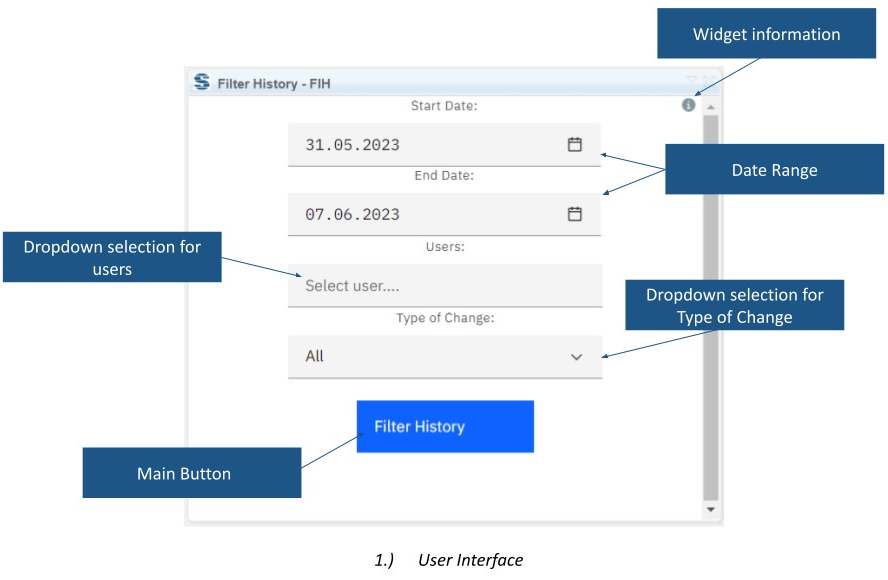
Filter History displays DOORS Next module changes in the mini dashboard. It lets reviewers narrow the report by date range, responsible user and change type while keeping the module open.
About this offering
Review module changes without losing contextWorkflow at a glanceInputs and resultsTechnical fit and boundariesEvaluation questionsPlan your evaluation
Review module changes without losing context
Filter History displays a change report in the IBM DOORS Next mini-dashboard. Reviewers inspect artifact IDs, authors and timestamps, filtering history by period, contributor and change type. It answers questions about a review window, a contributor’s modifications, or added and removed content. Individual records or the full result can be expanded, with links to further detail.
Workflow at a glance
Editorial overview based on vendor documentation.
- Define the windowOpen the module, set dates and choose a contributor if required.
- Select change typesChoose additions, modifications, removals or all types.
- Investigate recordsInspect IDs, authors and timestamps, expand entries and follow available detail links.
Inputs and results
Inputs are accessible module history and filters. Output is a report with distinct visual treatment for additions, edits and removals. Without dates, the default is seven days; without a user selection, all users in scope are included.
Technical fit and boundaries
The widget is module-only. Confirm release, deployment and history visibility in the relevant configuration. Unlimited retention, downloadable audit packages and compliance proof are not established; validate known sample changes.
Evaluation questions
Why is an older change absent initially? Check the seven-day window, access and context. Is this baseline comparison? No; it filters recorded changes by time, user and type.
Plan your evaluation
Supply the module/configuration, period, contributors, known changes and export needs. Confirm eligibility, installation and support scope in the offer.
Related options to compare
- Compare Module Across Configurations — Compare configuration states when that better answers the review question.
- Artifact Version Number — Expose baseline-relative version/revision values alongside reviewed requirements.
These are editorial suggestions for related scenarios; they do not imply a shared licence or a product integration.
Source: Official documentation.
