


Compare Module Across Configurations

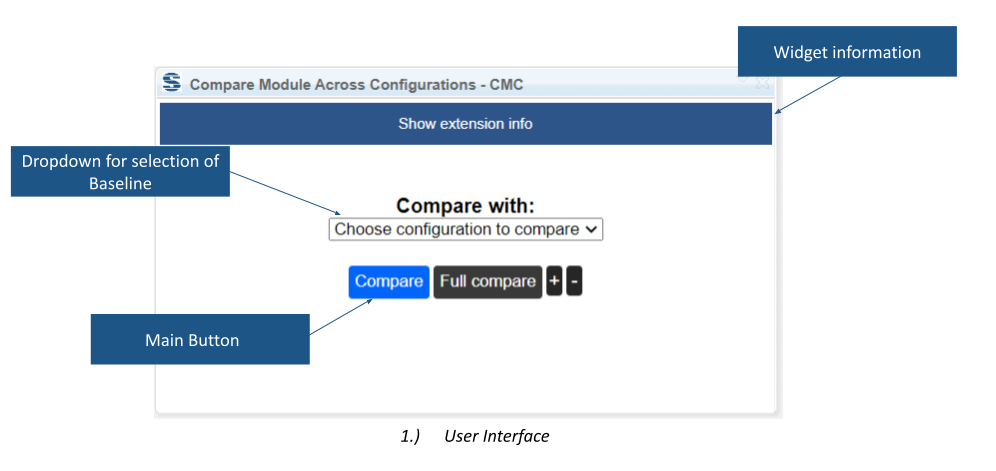
This widget compares a DOORS Next module with the same module in another configuration. It highlights artifact changes and provides a route to the native full comparison for further inspection.
About this offering
See what changed in the module under reviewWorkflow at a glanceInputs and resultsTechnical fit and boundariesEvaluation questionsPlan your evaluation
See what changed in the module under review
Compare Module Across Configurations focuses IBM DOORS Next comparison on a module and its artifacts. Reviewers see added, modified and removed content in a hierarchy retaining relevant headings. Compare a stream with an earlier baseline or another applicable configuration. Changed sections can stay expanded while unchanged sections collapse. Selecting an artifact navigates to its module position.
Workflow at a glance
Editorial overview based on vendor documentation.
- Choose the comparisonOpen the module and view, then select the reference configuration and mode.
- Inspect changesReview the hierarchy and expand other sections when context is needed.
- Follow throughJump to an artifact or use Full Compare for the native comparison, including link changes.
Inputs and results
Inputs are the same module across configurations and the chosen mode. Output is a navigable difference view. The vendor describes attribute-change, Version/Revision and combined variants.
Technical fit and boundaries
A module and selected view are required. Version/Revision mode needs those attributes. Tags and comments are excluded. Link changes are not colour-coded in the focused view and require Full Compare. Confirm the offered variant, release and accessible configurations.
Evaluation questions
Does a clean view prove links are unchanged? No; inspect links with Full Compare. Must unchanged sections be expanded? No; controls let reviewers reveal only needed context.
Plan your evaluation
Provide the module, configurations, view, required mode and sample content/link changes. Confirm variant availability, vendor eligibility, installation and support in the offer.
Related options to compare
- Artifact Version Number — The AVN mode compares Version and Revision fields when the appropriate attributes and variant are configured.
- Filter History — Investigate changes by period and contributor instead of comparing two configuration states.
These are editorial suggestions for related scenarios; they do not imply a shared licence or a product integration.
Source: Official documentation.
