


Change Set Management for IBM DNG

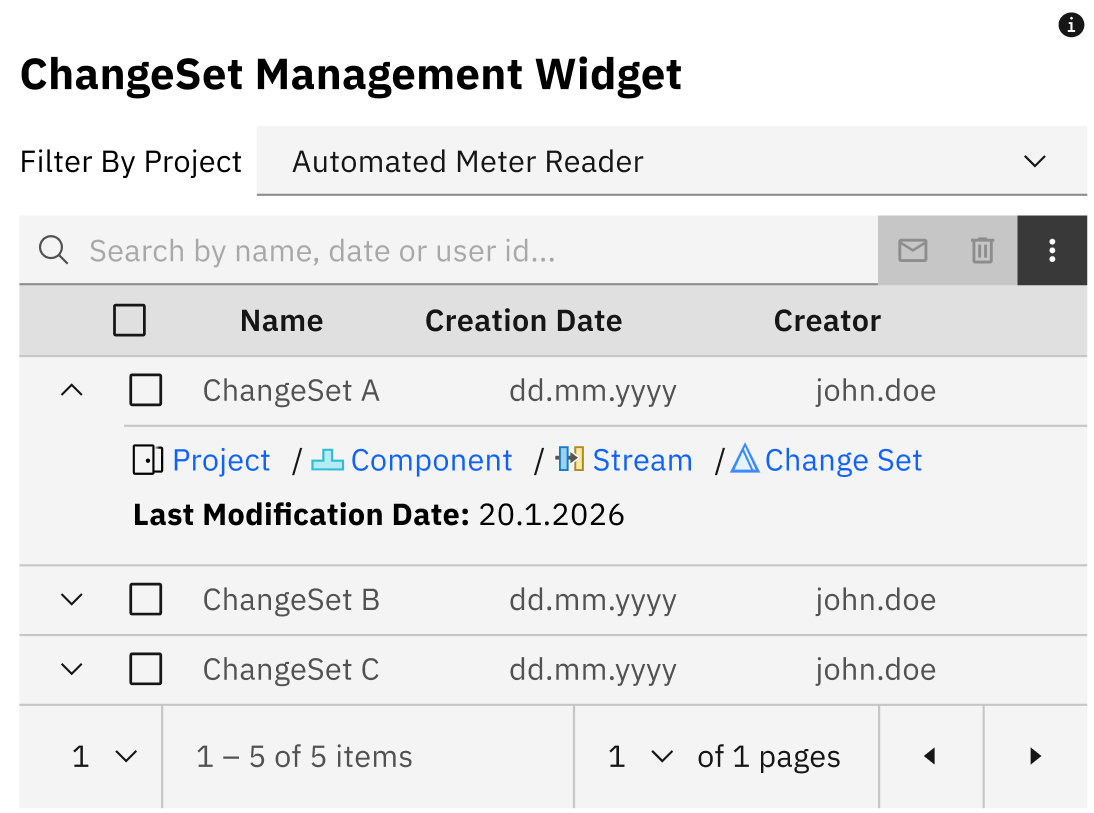
Change Set Management provides an administrative view of DOORS Next change sets and their configuration context. Authorised users can filter entries, contact creators and initiate supported discard actions within their permissions.
About this offering
Review open change sets with ownership and contextWorkflow at a glanceInputs and resultsTechnical fit and boundariesEvaluation questionsPlan your evaluation
Review open change sets with ownership and context
Change Set Management gives authorised IBM DOORS Next administrators and configuration leads a consolidated view of manageable change sets. It supports discovery, filtering, contextual review, owner notification and controlled discard. For work across projects, components and streams, creator details and the RM configuration path distinguish active work from entries needing follow-up. The native configuration lifecycle remains in place.
Workflow at a glance
Editorial overview based on vendor documentation.
- Find relevant workFilter the authorised scope and inspect ownership and configuration context.
- Notify ownersUse an agreed review period and configuration links to request resolution.
- Complete approved cleanupDiscard confirmed unnecessary entries through explicit confirmation, then inspect results and failures.
Inputs and results
Inputs are the accessible backlog, permission context and notification settings. Outputs are a management view, notifications and, when authorised, discarded change sets. The widget does not edit requirement content or replace native delivery.
Technical fit and boundaries
A restricted list does not represent the entire repository. Discard is destructive. Exact permissions, supported versions, notification infrastructure, service/API dependencies and partial-failure handling require target-environment validation.
Evaluation questions
Can old entries simply be deleted? Age alone does not establish obsolescence; review purpose and owner. Does this replace change-set delivery? No; delivery remains native.
Plan your evaluation
Share the configuration model, sample backlog, roles, notification route, review period, discard policy and failure-handling expectations. Agree deployment, configuration and support; no operational SLA is implied.
Related options to compare
- Compare Module Across Configurations — Investigate content differences when reviewing the purpose of outstanding work.
- Module Baselines — A related configuration-governance concern; shared implementation or licensing is not implied.
These are editorial suggestions for related scenarios; they do not imply a shared licence or a product integration.
Source: Official documentation.
