


Module Baselines

Module Baselines supports creating and navigating baselines from within a DOORS Next module. Add a naming prefix and description, then use the extension's list to revisit baselines created through its workflow.
About this offering
Bring baseline creation and navigation into the moduleWorkflow at a glanceWhat the list representsTechnical fit and boundariesA practical questionCommercial scope and next step
Bring baseline creation and navigation into the module
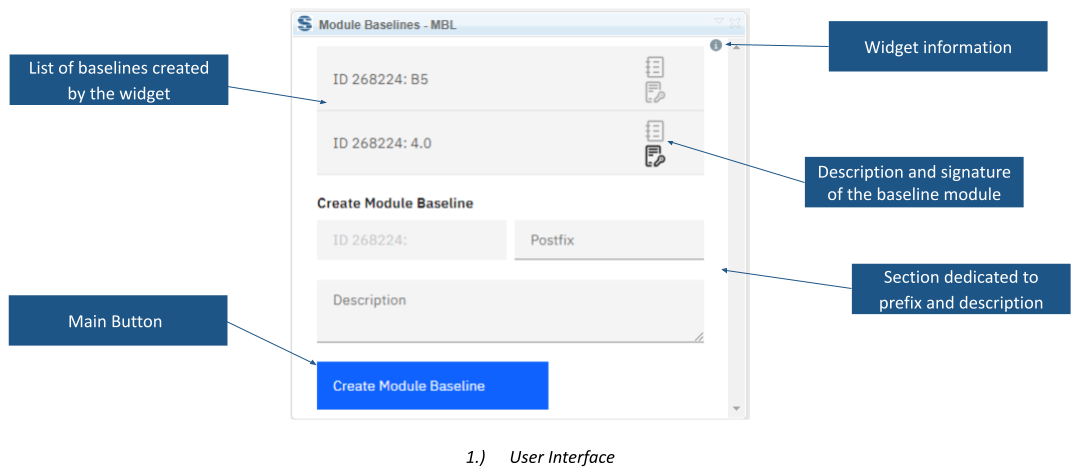
Module Baselines gives IBM DOORS Next users a module-level interface for creating baselines and navigating the list maintained by the widget. It suits reviews needing named reference points and access to their description or signature areas.
The widget takes a prefix and description and presents created entries in a list. Selecting one changes the active configuration to that baseline.
Workflow at a glance
- Open the module context.Confirm the working configuration and required review reference point.
- Name and create the baseline.Provide prefix and description using the documented module-ID-based convention.
- Navigate and inspect.Select a baseline to change configuration or open its description and signature areas.
What the list represents
The list refreshes between modules and places the most recently created baseline first. It contains only baselines created through this widget. Other native baseline workflows can therefore produce entries absent from this list.
Technical fit and boundaries
The script runs only in module context. Selecting an entry changes the entire active configuration, which affects the context of subsequent work. Access to an electronic-signature area does not establish completed approval or compliance. Confirm supported releases, installation and creation permissions.
A practical question
Will the widget list every existing baseline?
No. The list is limited to widget-created baselines.
Commercial scope and next step
Confirm eligibility, installation assistance, support and charges. Supply release, component/configuration structure, naming convention, existing baseline practices and how descriptions or signatures participate in reviews.
Related options to compare
- Change Set Management for IBM DNG — Reuse and compare requirements. Review open DOORS Next change sets, contact their creators and manage permitted cleanup actions.
- Tailoring Addon — Reuse and compare requirements. Select requirements from a template using logical conditions, then duplicate or reuse them in a target module.
These are editorial suggestions for related scenarios; they do not imply a shared licence or a product integration.
Source: Official documentation.
