


Request Project Access

Request Project Access provides a request workflow for users who lack access to a project area. A request sends email notifications to configured administrators and, optionally, users with specified roles.
About this offering
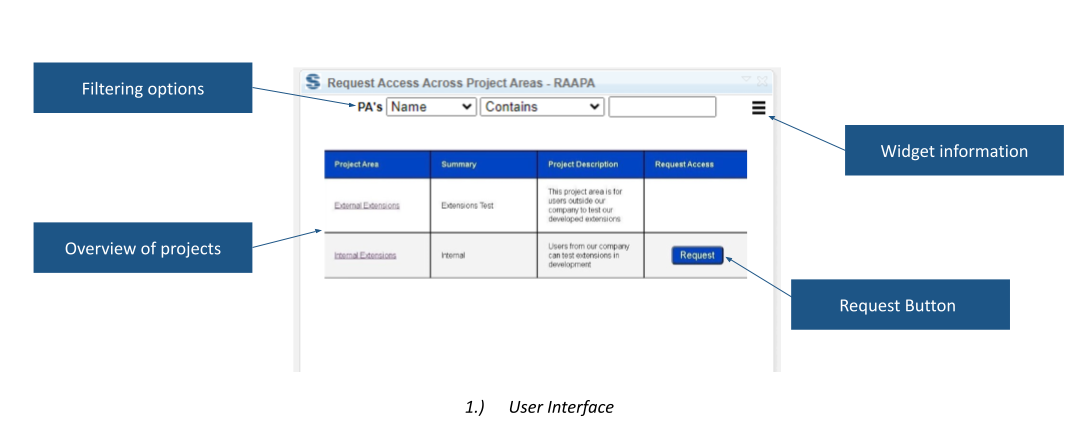
Give users a defined route to request project accessWorkflow at a glanceComponents and data flowTechnical prerequisites and limitsA practical questionCommercial scope and next step
Give users a defined route to request project access
Request Project Access connects a client widget with a Node.js server component so users without administrator privileges can request project membership. Request Access sends email to configured administrators and optionally holders of designated roles.
The workflow makes the request visible to responsible people. It does not establish automatic approval or unconditional membership.
Workflow at a glance
- Prepare the administrator context.Run the server component and authenticate the administrator to relevant applications.
- Find the project.Review or filter the overview by name, description or summary.
- Request access.Activate the request action for a restricted project so configured recipients are notified.
Components and data flow
Client/server communication covers RM, QM, CCM and GC contexts. Administrator activity updates the server-side project-area table. The client uses the overview for information and request controls, while the server supports notification.
Technical prerequisites and limits
The server script must run on a port. The administrator must authenticate to each application, at least by opening it. Projects unavailable to that administrator are absent from the server overview. Confirm hosting, network access, email setup, releases and operational ownership.
A practical question
Does pressing Request Access grant membership?
The documented action sends email. Approval and subsequent membership administration remain organisational responsibilities.
Commercial scope and next step
Agree eligibility, server setup, maintenance, support and charges. Provide the application landscape, visibility rules, approval roles, email route and hosting constraints. Identify the server operator and membership administrator.
Related options to compare
- Project Explorer — Administer DOORS Next projects. Browse accessible projects, components, configurations and modules from a structured overview in the DOORS Next mini dashboard.
- Delete Duplicated Views — Administer DOORS Next projects. Find duplicate views in a DOORS Next module and remove them through a dedicated widget.
These are editorial suggestions for related scenarios; they do not imply a shared licence or a product integration.
Source: Official documentation.
