


Delete Duplicated Views

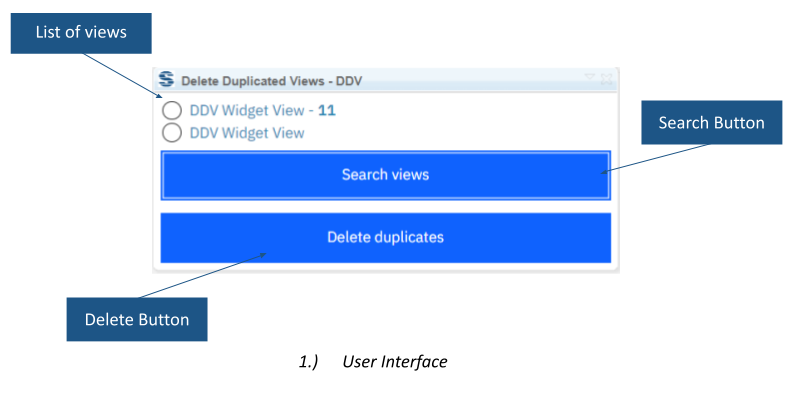
Delete Duplicated Views identifies repeated views in a selected DOORS Next module. It lists the original view and its duplicates, then provides an action to remove the duplicates.
About this offering
Make module view cleanup deliberateWorkflow at a glanceInputs and resultsTechnical fit and boundariesEvaluation questionsPlan your evaluation
Make module view cleanup deliberate
Delete Duplicated Views searches views of a selected IBM DOORS Next module, identifies duplicate entries and offers removal. This focused housekeeping extension helps administrators and module owners. Search output lists the original view and associated duplicates with their count, giving operators a review point before deletion when repeated maintenance has made views difficult to navigate.
Workflow at a glance
Editorial overview based on vendor documentation.
- Set the contextOpen the intended module and select a view as required.
- Inspect duplicatesSearch and review listed entries and duplicate counts.
- Apply agreed cleanupConfirm retention decisions, remove duplicates and check that required views remain.
Inputs and results
Inputs are module views. Search produces duplicate entries and counts; removal deletes duplicated views. Filter consolidation, settings merging and repository-wide cleanup are not established.
Technical fit and boundaries
A module and selected view are required. Confirm permissions, release and installation. Exact matching criteria and the rule determining which view survives are not specified publicly and must be demonstrated on representative examples.
Evaluation questions
Does it compare across projects? That broader scope is not documented. Is there an automatic undo? Recovery or undo is not documented; agree retention and recovery arrangements before deletion.
Plan your evaluation
Share the release, affected module, examples, settings that must remain distinct, retained views, permissions and recovery expectations. Confirm eligibility and delivery/support scope. Cleanup decisions remain part of customer governance.
Related options to compare
- Advanced Filtering — Create and refresh meaningful filtered views after agreeing which views should remain.
These are editorial suggestions for related scenarios; they do not imply a shared licence or a product integration.
Source: Official documentation.
