


Module Attributes Statistics

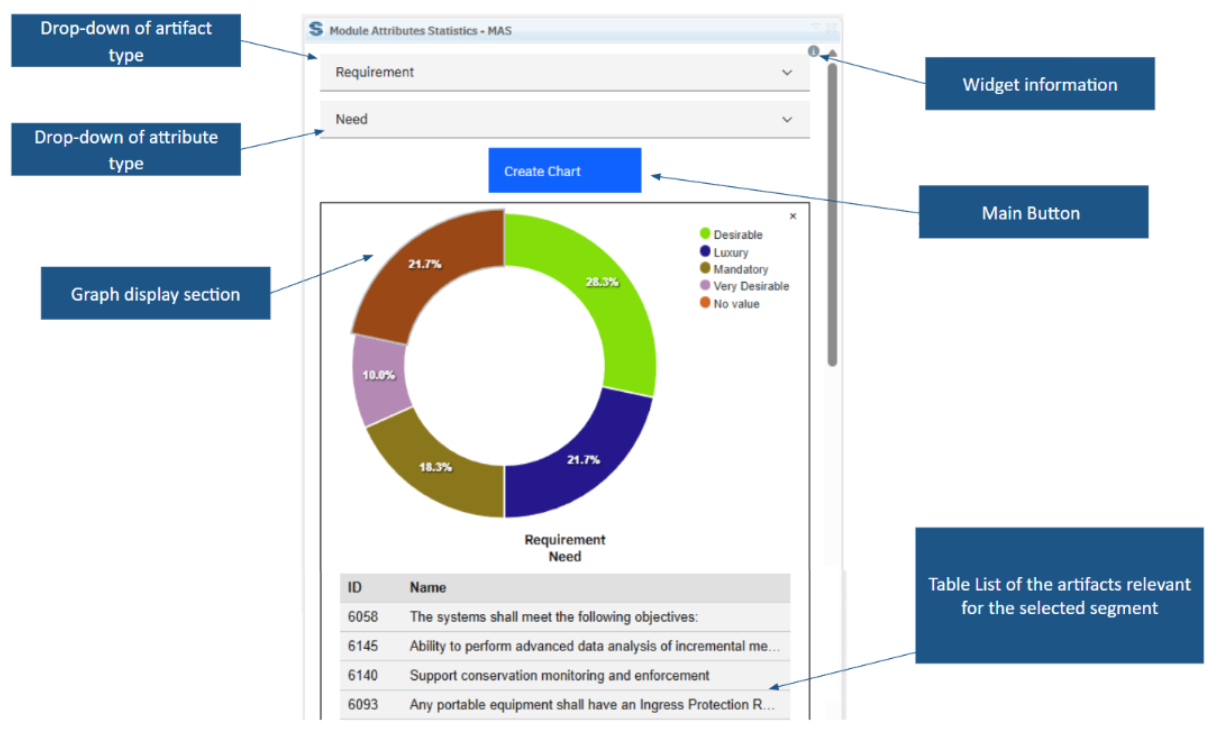
Module Attributes Statistics summarises selected DOORS Next attribute values in pie or bar charts. Review counts and percentages, then select a chart segment to inspect its associated artifacts within the module.
About this offering
See attribute distributions while reviewing a moduleWorkflow at a glanceSupported information and continuityTechnical fit and limitationsA practical questionCommercial scope and next step
See attribute distributions while reviewing a module
Module Attributes Statistics turns supported IBM DOORS Next attribute values into visual charts in the module workspace. Requirements engineers and managers can inspect status distributions without first building a separate Report Builder report.
Charts show counts and percentages for the selected artifact type and attribute. Reviewers can move from a segment to its underlying artifact list and then to a particular artifact.
Workflow at a glance
- Choose the dimension.Select an artifact type and supported attribute in the module.
- Create the charts.Generate the visualisations needed for the review.
- Inspect the records.Select a segment for artifact IDs and names, then navigate from a row to the artifact.
Supported information and continuity
The documented scope covers user-related attributes, enumerations and booleans. Pie charts display distributions, while bar charts support the described enumeration scenarios. Selections are cached to reduce repeated setup. The extension recognises module configuration context and describes change-set operation.
Technical fit and limitations
The widget runs only inside a module. Cached selections can carry into another module, but matching types and attributes are needed for the same request to remain meaningful. Arbitrary numeric calculations, text aggregation and management-report exports are not established by the page. Confirm supported releases and installation.
A practical question
Can a percentage be traced to individual requirements?
Yes. Selecting a chart segment opens a related artifact table with navigation.
Commercial scope and next step
Confirm eligibility, installation, support and charges. Provide artifact types, attribute data types, configuration context and the decisions each chart should support.
Related options to compare
- Filter Comments — Review module content. Find DOORS Next requirements by the comments attached to them.
- Filter History — Review module content. Review module changes in DOORS Next and filter them by date, user and change type.
These are editorial suggestions for related scenarios; they do not imply a shared licence or a product integration.
Source: Official documentation.
