


FMEA Widgets

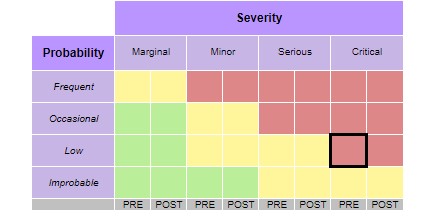
FMEA Widgets calculate result attributes from predefined inputs in DOORS Next. Depending on the selected variant, results appear in a risk table or through colour applied to module values.
About this offering
Choose the presentation for your FMEA modelWorkflow at a glanceInputs and resultsTechnical fit and boundariesEvaluation questionsPlan your evaluation
Choose the presentation for your FMEA model
FMEA Widgets calculate IBM DOORS Next result attributes from predefined risk inputs and display them in a table or, for a supported variant, the module view. Behaviour depends on model and variant. Analysts inspect a selected artifact’s result and messages about missing inputs, incorrect values or calculation errors. Pre-/post-mitigation options use separate attributes or an agreed stream/baseline arrangement.
Workflow at a glance
Editorial overview based on vendor documentation.
- Select model and variantAgree attributes, matrix, calculation and mitigation representation.
- Calculate and inspectTest representative values, missing inputs and errors.
- Review presentationCheck tables or supported module colouring against expected classifications.
Inputs and results
Inputs are risk attributes; outputs are result attributes and configured displays. Multiple tables or marked values are possible variants, not universally included functions.
Technical fit and boundaries
Multiple artifact selection disables the documented single-artifact table indication. Module colouring is browser-applied, with configurable delay and no underlying attribute-to-colour relationship. Confirm release, variant, installation, permissions and configuration. Independently validate calculations and mitigation.
Evaluation questions
Is colour a stored attribute value? No; visual treatment is separate from calculation. Can both mitigation states coexist? Separate-attribute or baseline/stream approaches are described, but must be chosen and validated explicitly.
Plan your evaluation
Supply the matrix/formula, attributes, mitigation approach, error cases, display variant and review evidence. Itemise adjustments, validation responsibilities, eligibility/licence and support. The widget does not itself establish safety compliance.
Related options to compare
- FMEA Analysis — Compare its calculation/display approach with configured widget variants for the agreed risk method.
These are editorial suggestions for related scenarios; they do not imply a shared licence or a product integration.
Source: Official documentation.
