


Embedded Picture Link

Embedded Picture Link scans a DOORS Next module for embedded images and creates traceability links to their base artifacts. Users choose the link type and receive a processing summary.
About this offering
Make embedded image usage traceableWorkflow at a glanceInputs and resultsTechnical fit and boundariesEvaluation questionsPlan your evaluation
Make embedded image usage traceable
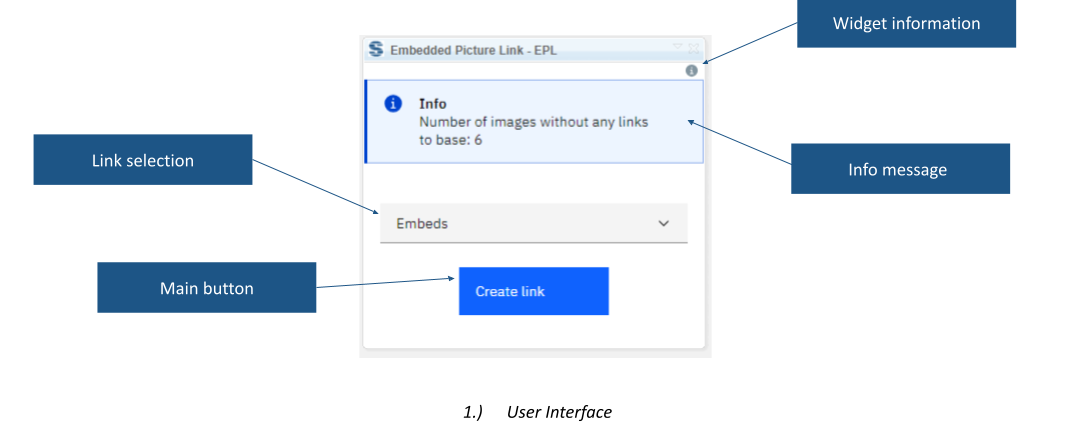
Embedded Picture Link scans an IBM DOORS Next module for embedded pictures and creates traceability links to source artifacts. Maintainers make image usage explicit when managing shared visual content. A visible picture alone may not provide the relationship needed for review. The widget reports unlinked images, allows link-type selection and reports successfully processed links.
Workflow at a glance
Editorial overview based on vendor documentation.
- Inspect the moduleOpen the module and review the reported unlinked-image count.
- Choose the relationshipSelect a link type matching the project’s traceability convention.
- Create and reviewRun processing, inspect the report and verify representative relationships.
Inputs and results
Inputs are embedded pictures and the selected link type. Outputs are explicit relationships and processing counts. The documented workflow scans the whole module; it is not a picture export or replacement tool.
Technical fit and boundaries
The extension is module-only. Confirm release, installation, source accessibility and permission to create the relationship. Links help trace usage but do not approve future image changes or establish that every external image location can be resolved.
Evaluation questions
Does it edit image pixels? No such function is documented; its purpose is linking existing content. Can our own link type be selected? Yes; validate its meaning and direction before processing.
Plan your evaluation
Share a sample module, storage approach, intended link type/direction, access constraints, release and expected traceability checks. Confirm eligibility, configuration, installation and support in the offer.
Related options to compare
- Embed Artifacts — Insert pictures or artifacts through configured markers before reviewing traceability.
- Image Gallery — A related visual-content review scenario; distinct scope and any integration require confirmation.
These are editorial suggestions for related scenarios; they do not imply a shared licence or a product integration.
Source: Official documentation.
