


Diagnostic Check

Diagnostic Check runs periodic checks against IBM ELM application services and sends email notifications about detected conditions. Administrators can configure the check interval, server context and notification settings.
About this offering
Bring scheduled Jazz diagnostics to ELM operatorsWorkflow at a glanceInputs and resultsTechnical fit and boundariesEvaluation questionsPlan your evaluation
Bring scheduled Jazz diagnostics to ELM operators
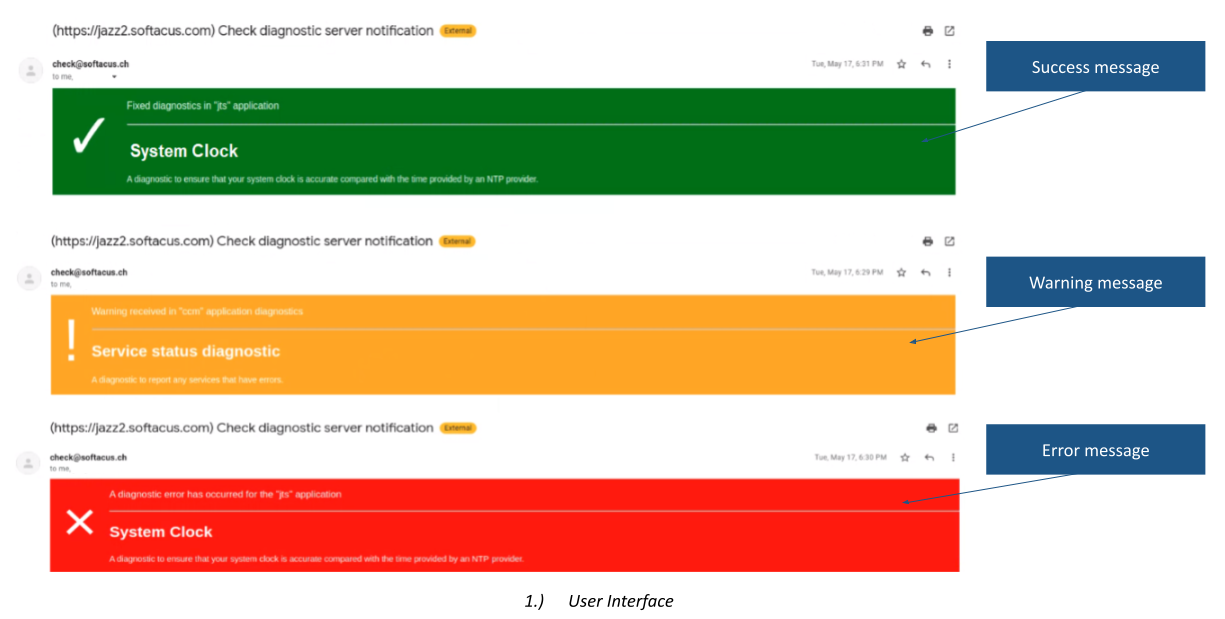
Diagnostic Check schedules checks for configured IBM Jazz applications and emails results to administrators. The vendor describes RM, CCM, QM and JTS coverage, with notifications identifying service, application, server and time. Operators can receive errors, warnings, success messages, permission-denied conditions, unresponsive-server reports and unhandled errors. Recipients, subject and additional detail are configurable.
Workflow at a glance
Editorial overview based on vendor documentation.
- Configure the environmentSet the Jazz domain, application scope and email server settings.
- Choose the cadenceDefine check intervals and notification behaviour for the support process.
- Investigate reportsInspect affected services and verify recovery through the operating procedure.
Inputs and results
Inputs are diagnostic responses, a schedule and email settings. Outputs are notifications describing reported conditions. Configurable intervals and an option to reduce repeated notification noise are documented.
Technical fit and boundaries
Email configuration uses Nodemailer settings. Confirm runtime location, application access, credentials handling, mail relay and network routes. Checks can themselves lose permission or fail to reach a server. Exact coverage and supported versions require validation.
Evaluation questions
Does a notification fix the problem? No; investigation and remediation remain operational activities. Does it guarantee availability? Scheduled checks do not establish outage prevention, complete observability or an SLA.
Plan your evaluation
List applications, versions, topology, access model, mail constraints, interval, recipients and escalation rules. Agree installation, configuration and support responsibilities, including applicable vendor eligibility terms.
Related options to compare
- IBM ELM Monitoring — Compare dashboard and infrastructure monitoring with scheduled application diagnostic notifications.
- SELMA — Consider broader managed operations when responsibilities extend beyond notification configuration.
These are editorial suggestions for related scenarios; they do not imply a shared licence or a product integration.
Source: Official documentation.
